 Airtime
 Ice: slick and icy surfaces
Words#
- Slick: the physics flag. A slick surface has no friction.
- Icy: a look. Icy surfaces are slick surfaces that look like ice. In the map editor a surface is normal, slick or icy. Slick and icy move exactly the same. Only the look differs.
What happens on ice#
| Normal floor | Ice | |
|---|---|---|
| Friction | 4 | none: you keep your speed |
| Acceleration | 5 | 1 (like the air); 4.05 while sprinting, the same as on any floor |
| Gravity on the ground | not applied | applied: you slide down sloped ice |
| Walljump off it | yes | no: slick walls never register as walls |
| Power slide | brakes 150 ups/s | still brakes 150 ups/s, even on ice |
So on ice:
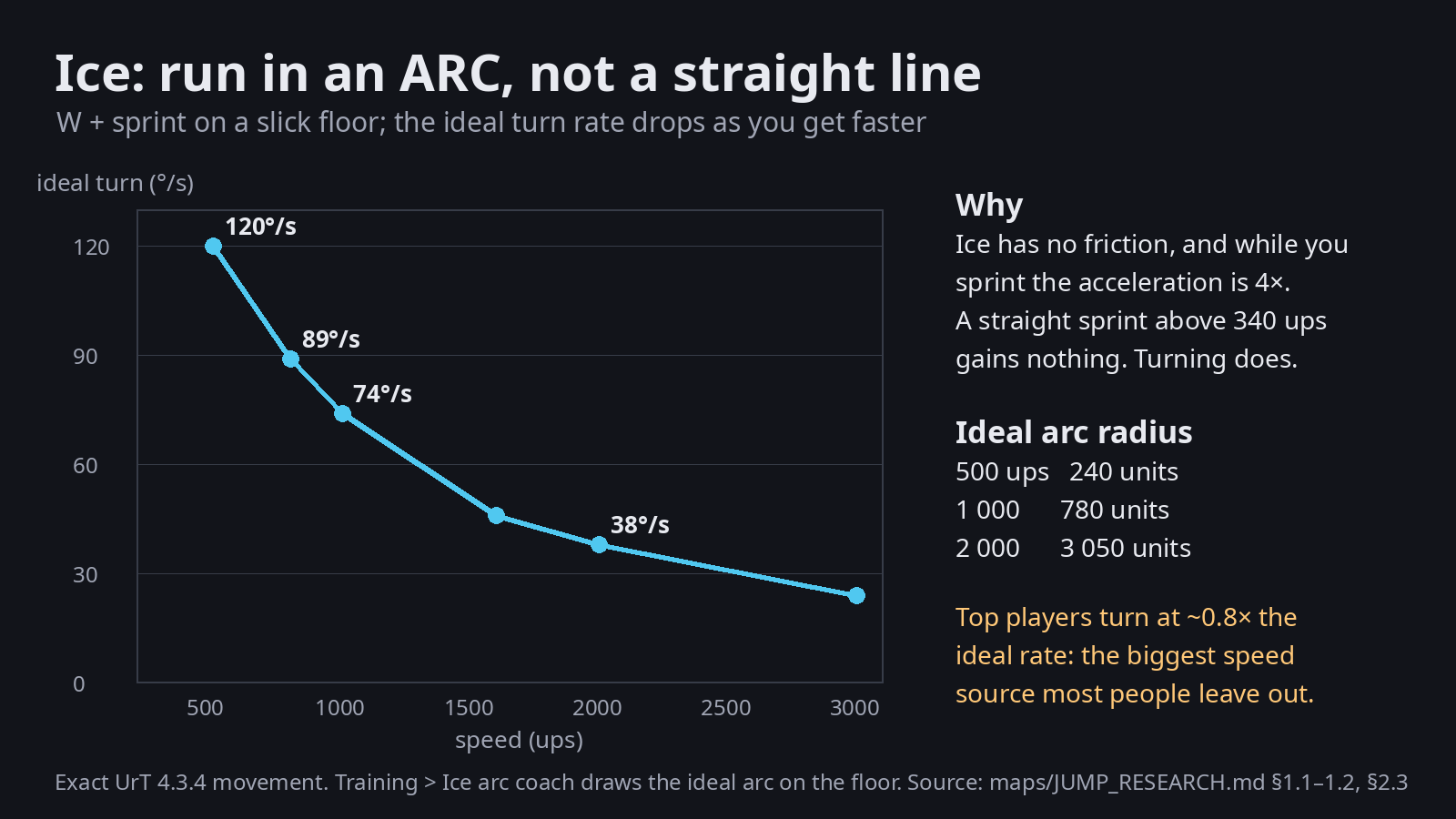
- Speed is never lost to friction. Only walls, slopes up and a power slide take it away.
- You steer with air-strafe-like control (acceleration 1). Sprinting gives a stronger push (4.05) while you're slower than 340.
- Downhill ice turns height into speed, and uphill ice turns speed into height.
Drop-ins#
The heart of icy maps (icyjumps, icyunleashed): you fall onto a curved slope (a quarter pipe, a half pipe, a bowl) so that your falling speed becomes forward speed along the curve.
- Where you land on the curve matters: landing on the steep top keeps the most speed. Landing on the flat bottom loses the falling speed into the floor.
- The angle matters: coming in along the curve keeps speed; across it bounces you.
- Curves are made of many flat slices (Rambetter's surface generators). The slice edges and the clip strips must be clean, or the curve stops you dead (the curve clip bug).
- The training tools rate drop-ins ("Drop-in rating").
Ice and walls#
- A slick wall gives no walljump. Mappers use this on purpose: an icy wall means "no shortcut here".
- A wall that is not slick next to ice is a walljump spot, often the only way up.
Seeing it#
- In the game: the slick view in the map debug menu shows every surface you slide on.
- In the map editor: the same slick view (Shift + I), for every piece you place.